Script to Video AI: How to turn text ideas into videos in one click
Have you ever thought that AI can help you generate a complete video just by inputting a piece of text? From pictures to dubbing, from editing to subtitles, everything is done automatically. This is not science fiction, but a new possibility that Image Mover's Script to Video feature is bringing to content creators.
In the past, video production was a technical job that required a professional team, equipment, editing software and a lot of time. Now, AI makes the process simple and fast, and even novice users can easily get started. So, how does Image Mover's Script to Video feature work? Can it really meet our needs? Let's explore this novel and powerful tool together!
What is the Script to Video feature?
The Script to Video feature is a major innovation in AI technology, allowing users to convert any form of text scripts, such as articles, stories, product descriptions, etc. into dynamic video content. Compared with traditional video production methods, this feature can greatly save time and cost, and allow anyone to create professional video content in minutes.
ImageMover's Script to Video feature provides users with a simple tool that does not require professional design skills or video editing experience. You only need to prepare the text content, and the AI system will intelligently analyze and automatically generate relevant pictures, dubbing, subtitles and background music for you, and finally generate a smooth video. With the Script to Video feature, you can convert any form of text into a creative and attractive video, greatly improving the dissemination effect of the content.
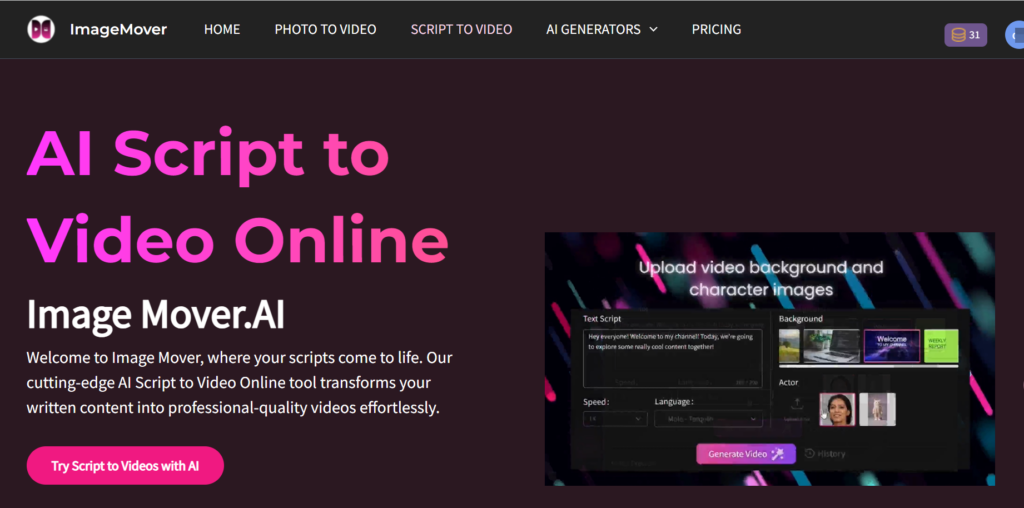
How to use Image Mover's Script to Video feature?
Another highlight of ImageMover is its easy operation. Even if you have no experience in video editing, you can easily get started. Here are the steps to use ImageMover's Script to Video:
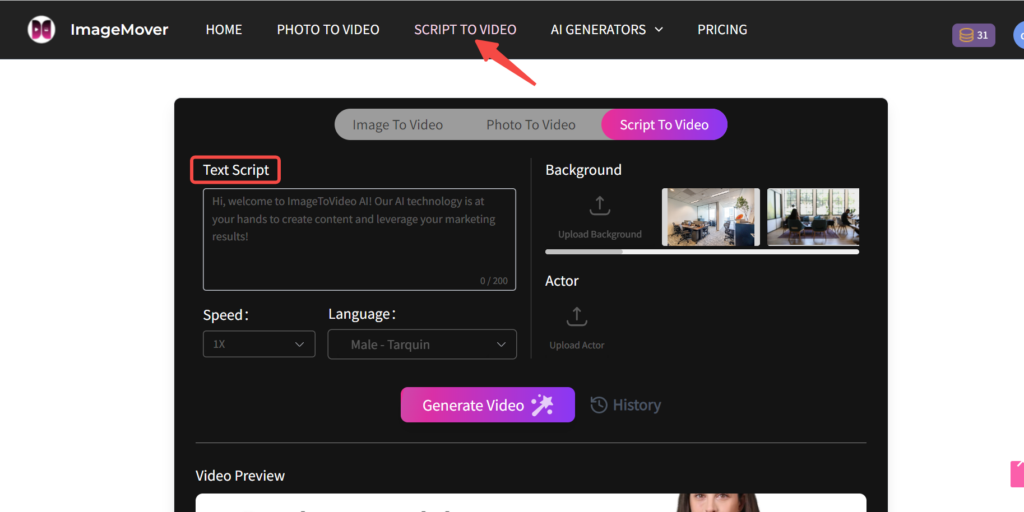
Step 1: Enter the script content
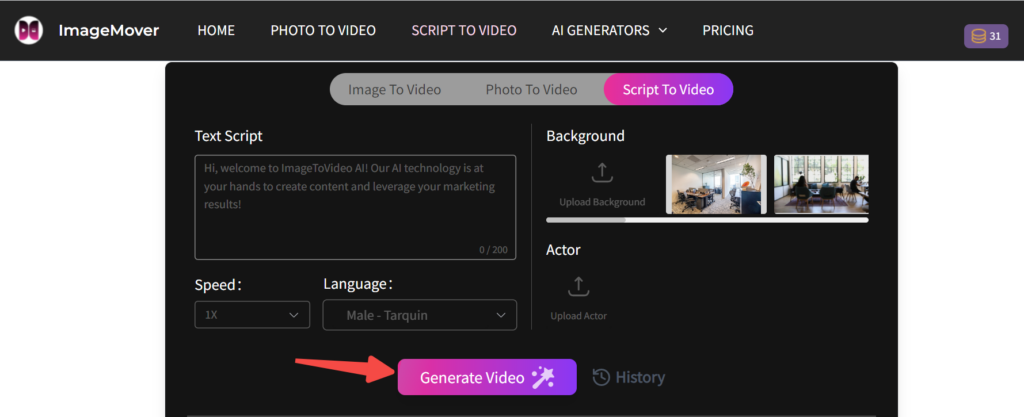
Click the "Script To Video" item to enter the video creation page. Enter your text script, which can be an article, story, product description or any video content you want to convert.
Step 2: Select your language and adjust your settings
Choose the right voice based on the content of the video, supporting multiple languages and intonations. You can also adjust the speed and voice style to ensure that the dubbing is more suitable for the content.

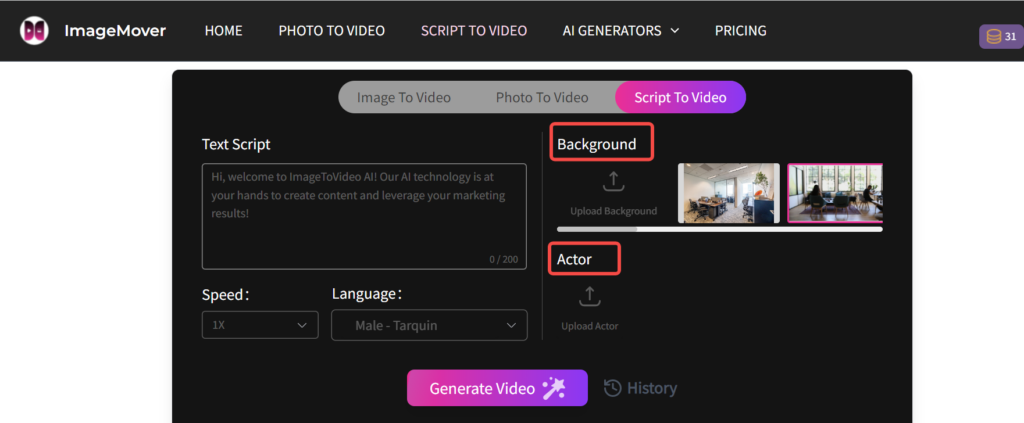
Step 3: Custom backgrounds and actors
You can customize your background and characters. To ensure your video is more accurate, please upload images of the video background and character avatars.
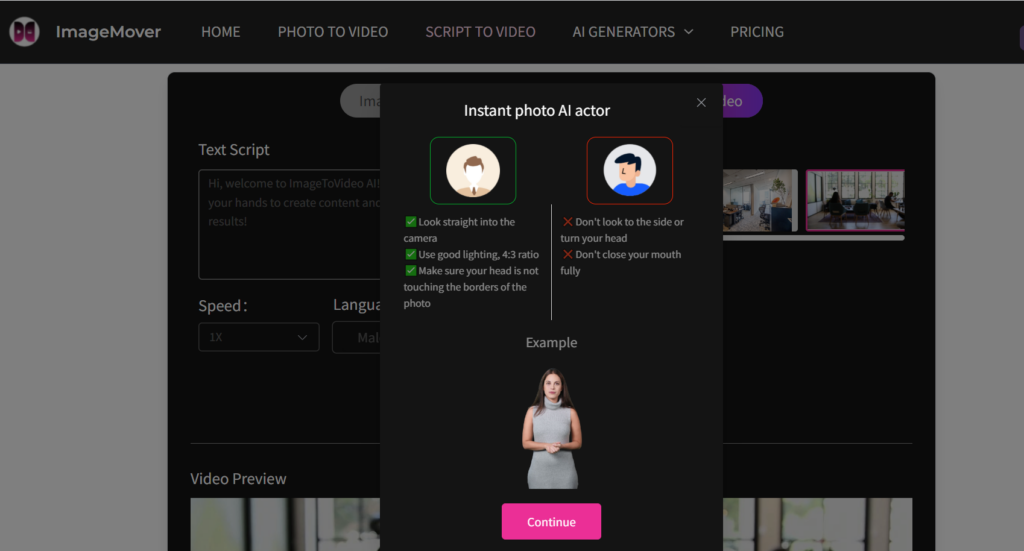
Step 4: Generate and share
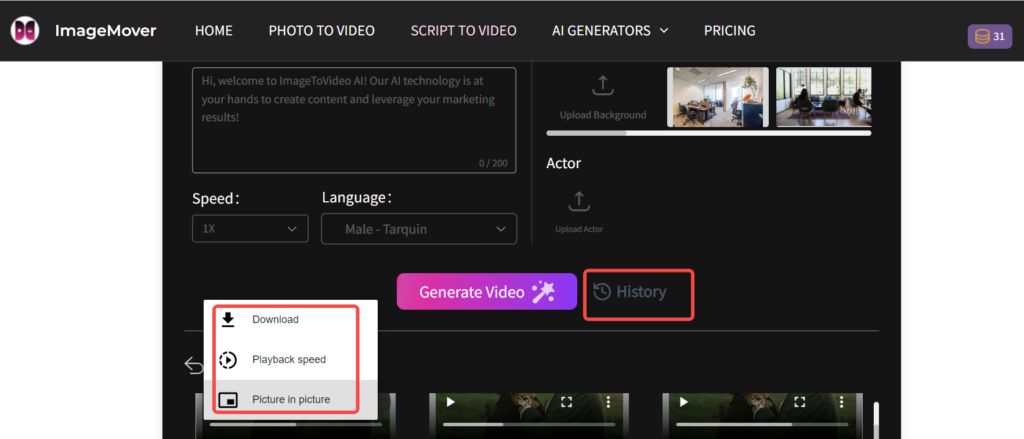
Click the "Generate" button and ImageMover's AI system will automatically generate a video. Find the generated video in "History" and click "Download" to download the video directly, or share it on social media to interact with the audience.
ImageMover vs. Other Platforms: Why ImageMover?
There are many AI video generation platforms on the market today, including Pictory, Synthesia, Runway, etc. However, ImageMover has gradually stood out with its outstanding innovation, intelligence, and high customizability. Let's take a look at the advantages and features of these platforms to help you choose the right one to use.
ImageMover vs Pictory
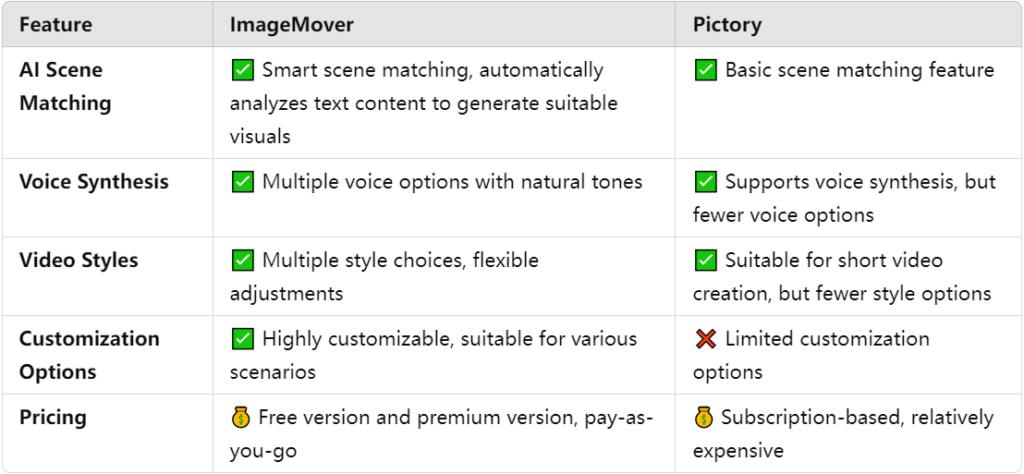
As can be seen from the above picture, ImageMover provides more customization options. Users can not only choose different video styles, but also adjust the dubbing, background, etc. of the video, so that each video can show a unique personality.
ImageMover vs Synthesia
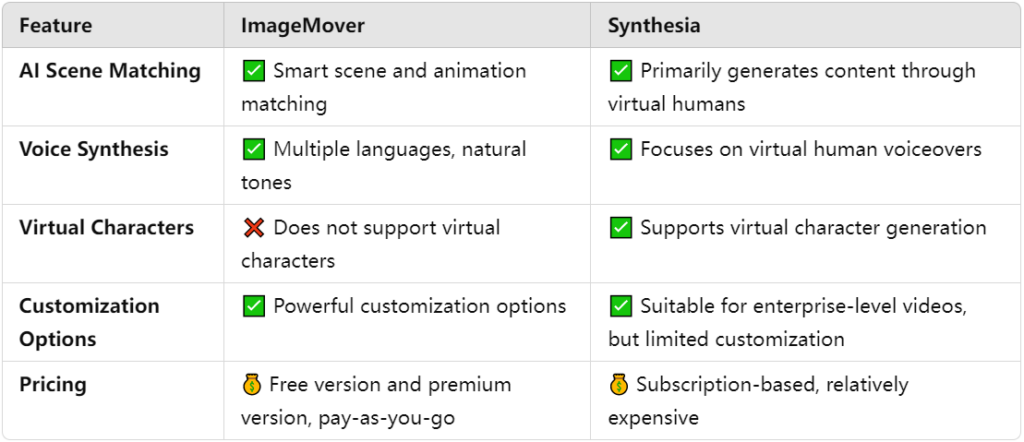
Compared with Synthesia's virtual human video production, ImageMover focuses more on flexibility and a wide range of applicable scenarios, and is more suitable for users who want to make videos with rich content and diverse styles. ImageMover does not rely on virtual humans, but through a wider library of materials and intelligent algorithms, allows users to freely choose pictures and dubbing, making video creation more personalized.
ImageMover vs Runway
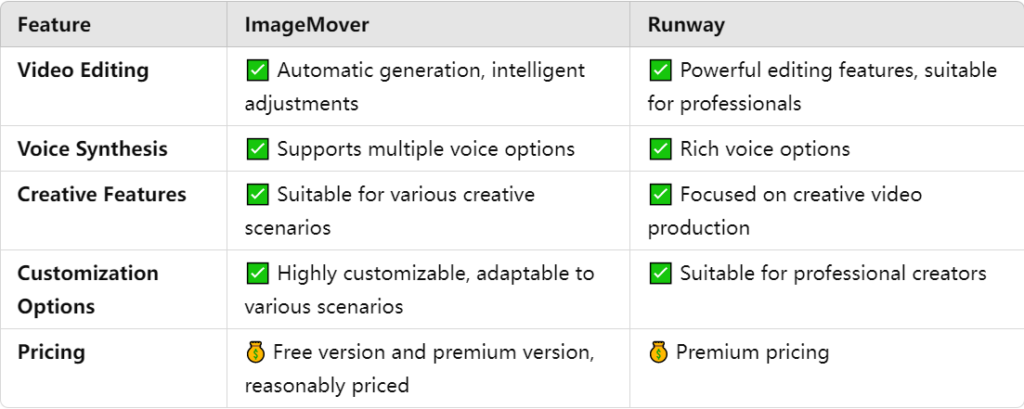
The difference between ImageMover and Runway lies in the depth and breadth of functionality. Runway is suitable for professional creators who need more powerful creative control and complex editing functions, while ImageMover focuses on simple operation and wide applicability, especially for users who need to make videos quickly.
ImageMover: Breaking the traditional boundaries of video production
Core advantage 1: Super powerful AI picture matching technology
ImageMover can automatically analyze text content through advanced AI technology and intelligently select relevant video clips, animations and images to ensure that the visual effects of the video content perfectly match the script. Compared with other platforms such as Pictory and Synthesia, which mainly rely on templates and fixed elements, ImageMover provides more flexibility and personalized options to make your video more creative and visually impactful.
Core advantage 2: Natural and smooth speech synthesis
ImageMover uses advanced text-to-speech technology, supports multiple languages and intonations, and provides realistic and natural voice dubbing. Compared with AI dubbing on other platforms, ImageMover's voice is more emotional, making the video more attractive and immersive. Whether you are making an advertising video or explaining educational content, ImageMover can provide high-quality voice support.
Core advantage 3: flexible functions and user experience
ImageMover not only meets the needs of ordinary users, but also provides highly flexible functions, allowing professional creators to customize video content. Compared with Pictory's simple mode or Synthesia's virtual human application, ImageMover allows users to choose different styles and effects according to the scene, thus achieving more creative and personalized presentation.
Core advantage 4: more cost-effective pricing plan
Unlike some platforms with high subscription fees, ImageMover is divided into free version and premium version, and adopts a pay-as-you-go model, allowing users to choose the appropriate version according to their actual usage. Whether you are an individual creator or a team user, ImageMover can provide you with an efficient and economical solution.
ImageMover's Script to Video in the future: smarter and more personalized
As technology continues to advance, ImageMover will become more intelligent and personalized in the future. In the future, ImageMover's Script to Video function will be able to understand content more accurately and match appropriate visual elements, and may even introduce smarter virtual actors to make video creation richer and more diverse.
At the same time, AI-generated videos will also become more interactive and immersive. Users can not only choose styles and dubbing, but also adjust content in real time based on feedback from video content to make it more in line with the interests and needs of the audience.
Conclusion: Let your creativity fly, ImageMover helps you make videos easily
Video creation is no longer the exclusive domain of professionals. ImageMover is changing the rules of the game, providing everyone with a low-cost, efficient, and easy-to-use video creation solution. Whether you are an independent creator, a corporate marketer, or an educator, ImageMover's Script to Video feature allows you to transform text into creative video content in the simplest way. Experience ImageMover now, so that creativity is no longer limited to text, but can be easily turned into videos at your fingertips!